Buyers stay informed. Buyer managers stay in control.
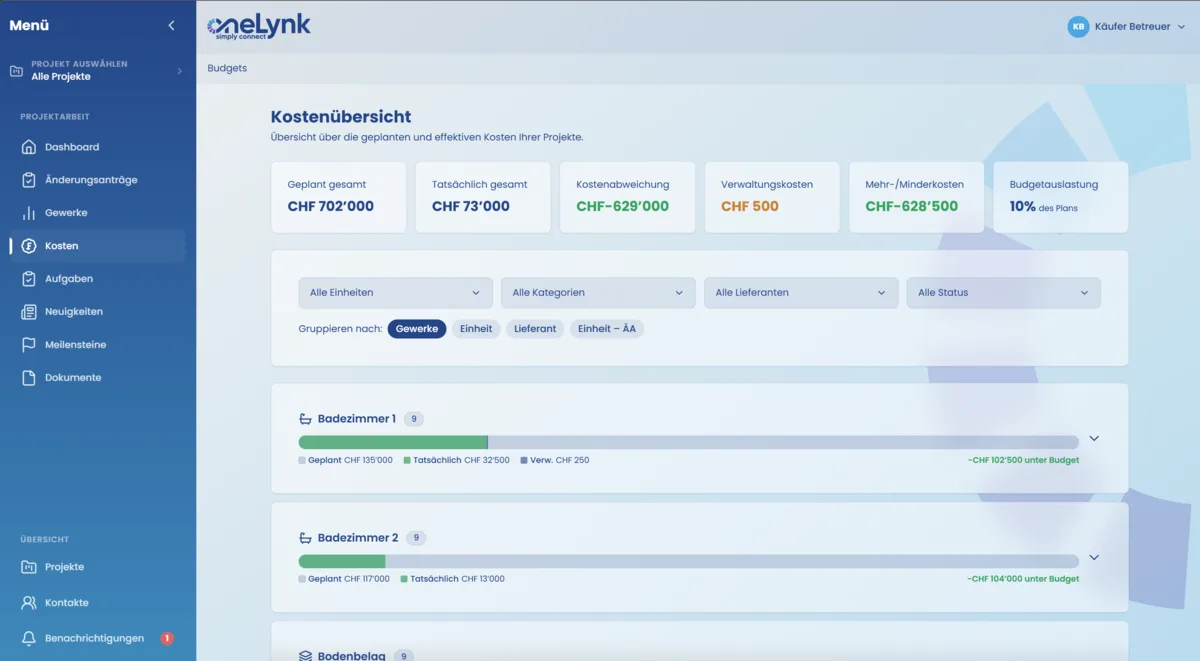
In oneLynk, buyers see their budget status at any time — in real time, automatically updated after every approval. For buyer management this means less explanation effort, fewer goodwill cases and cleaner handovers.
- Budget status always in the buyer dashboard — base budget, changes, balance
- Automatic update after every approval — no manual entry
- Overview for buyer management — all units at a glance
- Additional/reduced costs transparently shown — informed decisions instead of surprises
What changes concretely.
What budget transparency changes for all parties.
Budget transparency is one of the most common conflict points in buyer management. Buyers make selections without knowing the current budget status — and end up surprised by the final statement. In oneLynk, the budget status is always visible to the buyer: base budget, approved changes, pending requests, and the current balance. Every approval updates the status automatically. For buyer management, there is an overview of all units — at a glance, it is clear which units exceed the budget and where there is still room. This reduces discussions, prevents goodwill claims, and builds trust on both sides.
«Since we started using oneLynk, there are no more budget discussions at handover. Buyers know their status at all times.»
From practice: buyer manager, Swiss residential developerAbout Budget Transparency in Residential Construction
What does the budget dashboard show the buyer specifically?
When is the budget status updated?
Can buyer management adjust the budget status manually?
Can buyers see the budgets of other residential units?
50% less effort — see it in your project.
We show you oneLynk in 30 minutes — concrete, using your projects.