Every decision has a place.
Every step is documented.
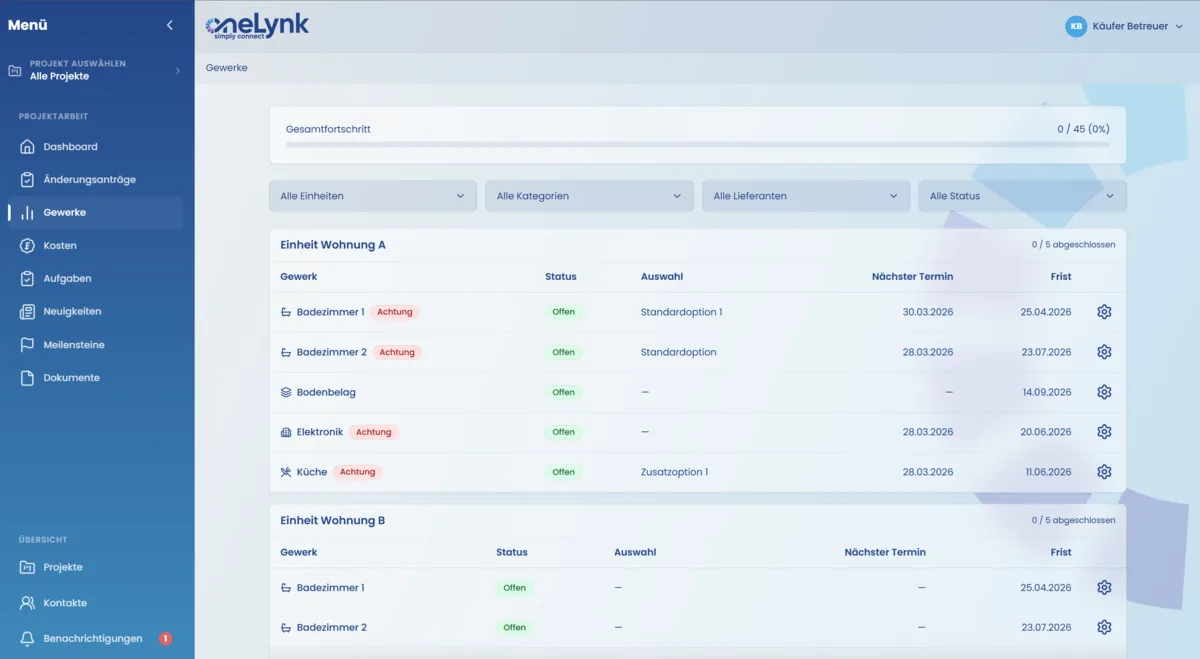
Change requests, quotes and approvals run through a structured process in oneLynk. Every task has a status. Every approval is documented with a timestamp. 80–90% less email traffic.
- Capture change requests in a structured way — nothing gets lost, nothing stays unresolved
- Quotes directly in the system — supplier uploads, buyer management reviews, buyer approves
- Digital approvals with timestamp — legally binding, traceable at any time
- Status at a glance — every task: Initiated, In Progress, Awaiting Approval, Completed
What changes concretely.
What happens when every decision is documented.
The core workflow in oneLynk follows five clearly defined phases: schedule appointment, capture request, obtain quote, grant approval, document completion. Each step is visible in the system — for buyer management, buyers, and suppliers, each with the information relevant to them. This reduces queries, prevents misunderstandings, and protects all parties in questions of liability. Instead of emails that get buried and spreadsheets that go stale, every task has a clear status.
«Before, we regularly argued at handover about what exactly had been agreed. Now we just show the documented decision history in the system.»
From practice: buyer manager, Swiss general contractorAbout Structured Workflows in Residential Construction
How does a change request work?
The buyer or your buyer support team records the request, and it goes to the right supplier. The supplier clarifies details directly with the buyer and submits a quote, which the buyer confirms. Your team then gets a task to prepare the final change order, including your markup, and sends it to the buyer, who approves it with two-factor authentication.
What if the buyer chooses the standard option?
If your team has set up a standard or premium option for a trade, the buyer can approve it directly — no quote round needed. This is configured per project, not switched on by default.
Can we see who approved what?
Yes. Every approval records who gave it and when. If a dispute comes up, you can show exactly what was agreed — without digging through email threads.
What happens if a buyer changes their mind?
The change is saved as a new version and the previous one is kept. You can always see what was agreed first and what changed afterwards.
How long does it take to get started?
With supplier offers, standards and project data at hand, a project is set up quickly — we fully configured a 15-unit project in half a day. The exact time depends on project size and the quality of your existing data. Onboarding is always included.
50% less effort — see it in your project.
We show you oneLynk in 30 minutes — concrete, using your projects.